Credit Union Visa Debit Card online shopping 3

Secure Online Shopping

Visa Secure makes it even safer for you to shop online. Visa has developed a program that helps confirm your identity when you make an online purchase. It’s a free service that protects your debit card against unauthorised use online. You do not need to register to use Visa.

The Benefit of Visa

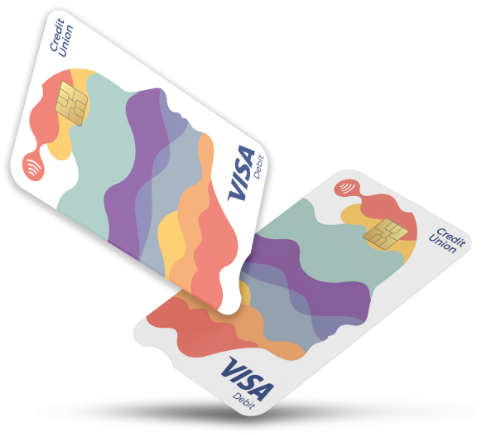
Visa is accepted at millions of locations around the world, bringing you a seamless, secure and convenient payment experience wherever you go. The new look Visa Debit card includes modern design features to further enhance card usability and accessibility.

Your new debit card has printed card details such as the long card number, expiry date and CVV instead of embossed details to improve clarity.

All your personal details are now in one place on the back of the card, making it easier to read.

We have changed to a portrait card design that reflects the way you use your card, tapping, slotting into chip readers and ATMs.

An accessibility notch at the end of the card makes it easier for visually impaired to insert it correctly into chip readers and ATMs.

What do I need to do?

If you have an existing Current Account Mastercard, when you receive your new Visa Debit card, you will need to activate your new card. There are instructions on the card mailer that will be delivered to your address shortly.

If you do not have a Current Account debit card and are a new user, you will receive your new Visa Debit card and you will need to activate it. There are instructions on the card mailer that will be delivered to your address shortly.

What-do-I-need-to-do
What if I need help?

If you require any assistance with these actions or have any queries in relation to the new Visa Debit card, check out the frequently asked questions (FAQ’s) below. Additionally, you can contact your credit union or call the Card Services number (01) 693 3333.

FAQ's

Why are you changing my debit card?

As part of our commitment to enhancing your banking experience, we are transitioning our Current Account debit cards from Mastercard to Visa. All current account holders will receive a new Visa Debit card as part of this enhancement.

The new look debit card is powered by Visa and comes with trusted benefits and enhanced features. The card will be issued to all existing and new Credit Union Current Account members.

When will I receive my new Visa Debit card?

The newly designed Visa Debit card will begin arriving by post in early 2026. You will receive an notification two weeks before your card is delivered, explaining what to expect and any steps you may need to take once it arrives. In the mean time your existing card will continue to work. No action is required by you until your new card arrives.

I received a new Visa Debit card, do I need to do anything?

Read carefully the ‘What to do next’ section on the enclosed card mailer and follow all of the steps detailed.

  • Sign your card immediately.
  • Obtain your PIN using the steps detailed on the mailer with the card. To obtain your PIN for use with this card, text PIN followed by your date of birth and the last four digits of your debit card number to 51155.
  • Create your Online Shopping Password, using the steps detailed on the reverse of the card mailer you received with your card.
    To create your online shopping password for use with this card, text PASSWORD followed by your date of birth and last four digits of your Visa debit card number to 51155
    Example: PASSWORD DDMMYYYY XXXX (ALL UPPERCASE LETTERS, with spaces as indicated above). Then simply follow the instructions for creating your password.
    Example: Create a strong memorable password using a minimum of 8 characters and maximum of 16, and containing at least 1 lower case + 1 upper case + 1 number + 1 special character ( ~`! @#$%^&*()-_+={}[]|\;:”<>,./? ).
    If you are asked for your password when shopping online and cannot remember it, don’t worry, you will have the option to click on ‘Forgot Password’ and reset a new password so that you can complete your payment
  • Complete a PIN transaction at an ATM or in a retailer to activate your card.
  • Once your physical card is activated, you can enable Contactless.

Do I need to add the new card to my Apple or Google Pay Digital Wallet?

Yes, if you wish to continue using your digital wallet, you will need to add your Visa debit card to your Apple Pay or Google Pay Wallet. Simply open the App, click on + and follow the instructions.

Do I need to remove my old debit card from my Digital Wallet?

Yes, Don’t forget to remove your old Mastercard from your Digital Wallet.

What happens to my recurring card payments e.g. subscriptions?

If you have payments or subscriptions set up on your existing debit card, you will need to provide the payment originator with your new Visa card details.

I have a joint account. Is there anything different I need to do with the new Visa Debit card?

Each cardholder will need to retrieve their PIN and activate their card. Please be aware that when one Visa Debit card on a joint account is activated, the other cardholder must also activate their card to avoid any interruption to debit card services.

What do I need to do with my old Mastercard?

Your Mastercard will be cancelled automatically once you activate your Visa Debit card. After activating your Visa Debit card, please destroy your old Mastercard by cutting it in half.

What is secure online shopping?

When shopping online using your Visa Debit card, you may be asked to enter a password you created along with a one time passcode sent to your phone. This helps us to ensure you’re better protected from fraud.

You will receive details on how to set up your online shopping password with your Visa Debit card.

What is Visa Secure?

Visa Secure is an online security service provided by Visa that adds an extra layer of protection to your online purchases, helping to prevent fraud and ensure that only you can authorize transactions with your card.

How do I set up my online shopping password?

To create your online shopping password for use with this card, text PASSWORD followed by your date of birth and last four digits of your Visa debit card number to: 51155.

Example: PASSWORD DDMMYYYY XXXX (ALL UPPERCASE LETTERS, with spaces as indicated above).

Then simply follow the instructions for creating your password.

Example: Create a strong memorable password using a minimum of 8 characters and maximum of 16, and containing at least 1 lower case + 1 upper case + 1 number + 1 special character ( ~`! @#$%^&*()-_+={}[]|\;:”<>,./? ).


What if I forget my Password?

If you are asked for your password when shopping online and cannot remember it, don’t worry, you will have the option to click on ‘Forgot Password’ and reset a new password so that you can complete your payment.

How are my online purchases secured with Visa?

Visa Secure is an online security service for Visa cards that adds a layer of protection against unauthorized use by verifying your identity when you shop online. It works automatically with participating merchants and sometimes requires you to verify your identity by entering a One-Time Passcode sent to your registered mobile phone number and using another method, a password.

Does this Visa Secure online service cost me anything?

There are no costs associated with this service

How will I know if my online purchase has this added layer of protection?

If you see the Visa Secure badge on participating online merchants’ websites, this indicates the use of the service.

Visa secure logo

How do I set up my online shopping password?

Once you have activated your Visa Debit card by completing an ATM or purchase transaction, you are ready to set up your password for use when shopping online.

To create your online shopping password , text PASSWORD followed by your date of birth and last four digits of your Visa debit card number to 51155.

Example: PASSWORD DDMMYYYY XXXX All UPPER CASE LETTERS with spaces as indicated above.

Then simply follow the instructions for creating your password.

Create a strong memorable password using a minimum of 8 characters and maximum of 16, and containing at least 1 lower case + 1 upper case + 1 number + 1 special character ( ~`! @#$%^&*()-_+={}[]|\;:”<>,./? ).
Creating a strong password

  • A strong password must be at least 8 characters long but can be up to 16 characters.
  • Use at least 1 lower case + 1 upper case + 1 number + 1 special character ( ~`! @#$%^&*()-_+={}[]|\;:”<>,./? ).
  • Avoid personal information and easily guessable sequences.
  • Use a different password for each application.

What happens if I forget my online shopping password?

When shopping online, if you cannot remember your password, simply click on ‘Forgot Password’ and create a new password so that you can complete your payment.

Now I have set up my online shopping password, when do I use it?

When shopping online and you are asked to confirm it’s you using your card, you will be asked to enter the password you created along with a one time passcode sent to your phone.

Follow the on-screen instructions to complete your purchase.

Can I change my online shopping password?

Yes. You can change your online password by texting PASSWORD followed by your date of birth and last four digits of your Visa Debit card number to 51155.

If my Visa Debit card is lost or stolen, do I need to create a new online shopping password?

Yes, as your new card will have a new card number, you will need to set up a new password for this card number.  You can use, a password you had previously used.

If I get a replacement Visa Debit card, do I need to create a new online shopping password?

No, once the card number on the replacement card is the same as the previous Visa Debit card, you wont need to set up a new password.

Can I reuse the same password?

Yes you can use a password, you previously used before.

Will I always be asked for a password when shopping online?

No. For some online transactions deemed to be low risk, you may not be asked for your password.

Can I opt out of this service?

No, you cannot opt out of this service if you want to use your Visa Debit card to shop online.

Do I need to have a mobile phone to shop online?

Yes. To help us keep you safe when using your debit card to shop online, we need to be able to send verify its you e.g. by sending a one-time passcode. Please make sure to update your credit union with your latest mobile phone number.

What happens if I get a new mobile phone number?

If you get a new mobile phone number, you will have to update your details with your credit union.